Free template
The time blocking template that survives Wednesday
Copy it, paste it into any calendar, and keep the buffers empty. No email, no download, no signup to read it.
No credit card · Free while in early access
Copy it, paste it into any calendar, and keep the buffers empty. No email, no download, no signup to read it.
No credit card · Free while in early access
Quick answer
A time blocking template is a reusable week layout that assigns named tasks to specific calendar slots before the week starts, so you are not deciding what to do each time you sit down. A time blocking template that lasts has three parts: anchor blocks that repeat every day, deep work blocks you name with a real task rather than a category, and empty buffer strips that absorb overrun. The free template below has all three, plus a five minute Friday review that corrects your estimates. Copy it and paste it anywhere. Nothing on this page is gated.
Select it, copy it, paste it into your calendar description, a notes app, or a document. The times are a starting shape for a standard working day, so move them to fit yours.
TIME BLOCKING TEMPLATE, ONE WEEK

Anchor blocks (same slot every day, set these once)
  07:30 to 08:00   Open, triage, pick today's one big thing
  12:15 to 13:00   Lunch, away from the screen
  16:45 to 17:00   Close, write tomorrow's one big thing

                MON        TUE        WED        THU        FRI
08:00 to 10:00  DEEP 1     DEEP 1     DEEP 1     DEEP 1     DEEP 1
10:00 to 10:15  buffer     buffer     buffer     buffer     buffer
10:15 to 12:15  meetings   DEEP 2     meetings   DEEP 2     admin
13:00 to 15:00  DEEP 2     meetings   DEEP 2     meetings   DEEP 2
15:00 to 15:30  buffer     buffer     buffer     buffer     buffer
15:30 to 16:45  admin      admin      admin      admin      review

Fill these in before the week starts
  DEEP 1  = the one task that makes the week count
  DEEP 2  = the second priority, or overflow from DEEP 1
  admin   = email, expenses, small requests, the ten minute jobs
  buffer  = keep empty on purpose, this is where overrun goes

Friday review, five minutes
  What did I plan?        ____ blocks
  What actually happened? ____ blocks
  Which block always slips? ______________
Next week: move it, shrink it, or delete it.A time blocking template uses four kinds of block, and each one has a different job. Mixing them up, usually by letting admin leak into a deep work block, is how a good week shape turns into a busy one.
| Block | Typical length | What goes in it | The rule |
|---|---|---|---|
| Anchor | 15 to 45 minutes | Triage, lunch, the end of day close | Same slot every day. Set once, never re-planned. |
| Deep work | 60 to 120 minutes | One named task, such as "draft the three findings sections" | Named before the week starts. A category is not a task. |
| Admin | About an hour | Email, expenses, small requests, ten minute jobs | Batched into one block, never scattered between deep blocks. |
| Buffer | 15 to 30 minutes | Nothing, until something overruns | Stays empty on purpose. It is not spare capacity. |
Almost nobody abandons time blocking because the idea is wrong. They abandon it for one of these three reasons, and each one has a fix built into the template above.
The common failure is a calendar with no slack in it, so the first overrun knocks every later block sideways and the plan is dead by Tuesday. Leave the two buffer strips in the template empty on purpose. A week that is 70 percent blocked survives a bad morning. A week that is 100 percent blocked does not.
A block called "work on the report" is a decision you have deferred, and you will pay for it at 08:00 on Monday with ten minutes of deciding. A block called "draft the three findings sections of the Q4 report" starts the moment you sit down. The research on implementation intentions is specifically about this: naming when, where and what closes the gap between intending and doing.
Time blocking is not a plan you write once, it is an estimate you correct. The Friday review in the template takes five minutes and asks one useful question: which block always slips? Move it, shrink it, or delete it. Changing one thing a week beats redesigning the whole system every month and abandoning it.
Time blocking fails quietly when the blocks are the right shape and the wrong size. The fix is not to try harder at estimating, it is to measure how wrong you usually are and multiply by that. Two weeks of this log is enough to get a number.
BLOCK ESTIMATE LOG, ONE LINE PER BLOCK

Task                     Planned   Actual   Ratio
-----------------------  --------  -------  -----
Draft the Q4 brief         2h00     3h15    1.6
Review pull requests       0h45     0h40    0.9
Client call and notes      1h00     1h50    1.8
                                            -----
                        Your personal multiplier: ____

Use it: next time you plan a block like one of these,
multiply your first guess by your own number, not by 1.0.
Expect the number to be above 1.0, because underestimating your own work is the normal case rather than a personal failing. In the study that named the planning fallacy, students predicted their thesis would be finished in 33.9 days and it took 55.5, and fewer than a third of them (29.7 percent) finished by their own best estimate. Even when the same students were asked to assume everything went as badly as possible, under half made that date.
Source: Buehler, R., Griffin, D., and Ross, M. (1994), Exploring the “planning fallacy”: Why people underestimate their task completion times, Journal of Personality and Social Psychology 67(3), 366 to 381, Study 1. Checked 17 September 2026.
Time blocking as a branded method has not been tested as a whole in controlled research, and any page quoting a precise percentage gain from time blocking has invented it. What is well evidenced are the three mechanisms a time block happens to combine.
Specifying when, where and how you will act, rather than only intending to act, produced a medium to large effect on goal attainment (d = .65) across 94 independent tests. Naming the task inside the block is the whole of this mechanism. Gollwitzer, P. M., and Sheeran, P. (2006), Implementation intentions and goal achievement: A meta-analysis of effects and processes, Advances in Experimental Social Psychology 38, 69 to 119. Checked 17 September 2026.
When you leave a task unfinished and start another, part of your attention stays with the first one and measurably degrades performance on the second. That residue is why a block of protected time beats the same number of minutes scattered across a day. Leroy, S. (2009), Why is it so hard to do my work? The challenge of attention residue when switching between work tasks, Organizational Behavior and Human Decision Processes 109(2), 168 to 181. Checked 17 September 2026.
People underestimate how long their own tasks will take, consistently and in a way that does not improve with experience of the same task. That is the case for buffers, and the case for the estimate log above. Buehler, Griffin and Ross (1994), cited in full further up this page.
What none of this shows is that time blocking beats any other planning method, or that it works for everyone. It shows that the ingredients are sound. Treat the template as a reasonable default to test against your own week, not a proven system.
The template tells you what shape the week should be. Filling it in every Sunday is the chore that kills the habit. In Taskly you say what the week holds in plain English, and Otto proposes the tasks, priorities and due dates as a before and after you approve or discard. Nothing is created until you say so.
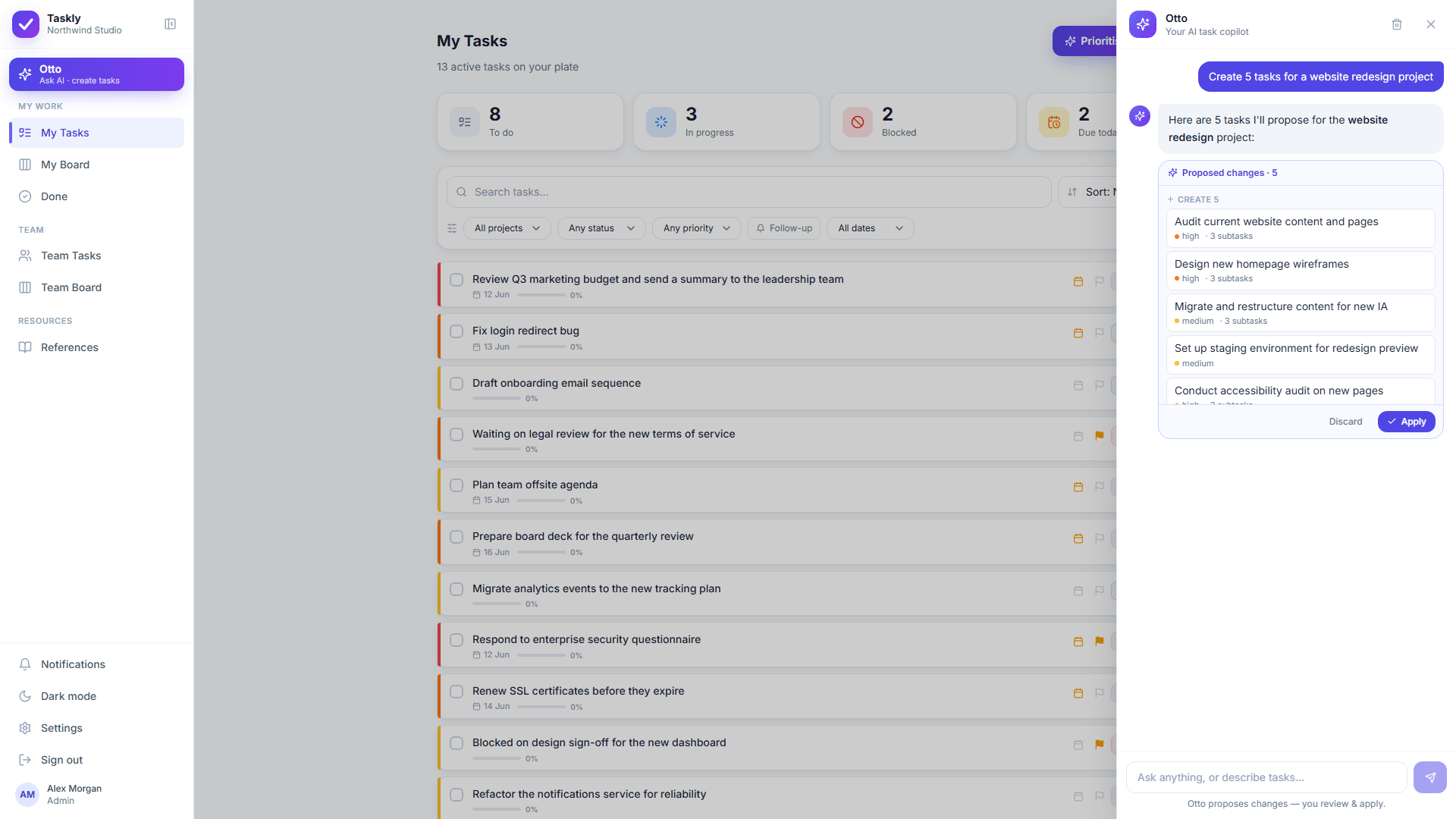
Otto proposes. Nothing is created, moved or reassigned until you approve it.
More on how that works: the AI task manager, Otto, and why Otto asks first.
Protecting the deep work blocks once they exist is a separate problem. See deep work strategies.
Planning a week with an ADHD brain? Start with the ADHD work planner and ADHD calendar apps.
This is a template page published by a task manager, so it is worth being plain about what the task manager is not.
Taskly has a month, week and day calendar, and it places each task on the day it is due. Taskly has no hourly grid, so a 08:00 to 10:00 block cannot be drawn in Taskly. The blocks in this template live in your calendar app. Taskly holds the tasks that go inside them.
There is no two way calendar sync today. If you want blocks pushed into Google Calendar automatically, Taskly is the wrong tool for that part of the job right now.
Otto can turn a described week into tasks with due dates. Otto cannot know that this particular draft always takes you three hours. That number comes from the estimate log, and only you can fill it in.
Otto proposes and you approve. Otto does not decline meetings, defend your morning, or say no to your manager on your behalf. Those remain human problems.
A time blocking template is a reusable week or day layout that assigns named tasks to specific calendar slots in advance, instead of leaving you to pick what to do each time you sit down. A good time blocking template has three parts: anchor blocks that repeat daily, deep work blocks you fill in before the week starts, and deliberately empty buffer strips that absorb overrun. The free template on this page has all three and can be copied and pasted into any calendar or notes app.
Using a time blocking template takes about ten minutes at the start of the week. Copy the grid, set the anchor blocks once so they repeat, then name the two deep work blocks for each day with a specific task rather than a category. Leave the buffer strips empty. On Friday, spend five minutes comparing what you planned against what happened and change exactly one thing for next week. The discipline is in the Friday review, not in the initial plan.
A time block should usually run between 60 and 120 minutes for focused work, while admin works best as one batched block of about an hour rather than small jobs scattered across the day. The limit on focused blocks is not willpower, it is that longer blocks hide bad estimates: a three hour block that goes wrong wastes three hours before you notice. Two 90 minute blocks with a buffer between them give you a checkpoint in the middle. Whatever length you pick, record the planned and actual time for a fortnight and let your own numbers correct you.
Time blocking usually stops working for one of three reasons, all of them fixable. The calendar was blocked end to end with no buffer, so the first overrun destroyed the rest of the day. The blocks were named as categories rather than tasks, so each one still needed a decision before it could start. Or the plan was never corrected: the estimates that were wrong in week one were still wrong in week four. The template on this page is built to address all three.
Time blocking as a packaged productivity method has not been tested as a whole in controlled research, and anyone claiming a precise percentage gain from it is inventing the number. What is well evidenced are the mechanisms underneath it. Specifying when and where you will act produces a medium to large improvement in goal attainment across 94 independent tests (Gollwitzer and Sheeran, 2006). Switching tasks leaves attention residue that measurably degrades performance on the next task (Leroy, 2009). And people systematically underestimate how long their own work will take (Buehler, Griffin and Ross, 1994). A time block is a practical way of acting on all three.
Blocking roughly 70 percent of your controllable hours and leaving the rest open is a reasonable starting point, and it is a starting point rather than a finding: no study sets the correct figure. The reason to leave slack is that people underestimate their own task completion times. In the study that named the planning fallacy, students predicted their thesis would take 33.9 days and it took 55.5, and fewer than a third finished by their own best estimate (Buehler, Griffin and Ross, 1994). A calendar with no slack assumes an accuracy humans do not have.
A to-do list answers what needs doing. Time blocking answers when each thing gets done, by giving it a specific slot in a real calendar. The two are complements rather than rivals, and most people who abandon time blocking did so because they blocked without a list to draw from and spent the block deciding. Keep the list as the source, and let the blocks be the commitment. Taskly holds the list. Your calendar holds the blocks.
An AI can do the drafting part of time blocking, which is the part most people give up on. In Taskly you describe the week in plain English, and Otto proposes the tasks, priorities and due dates as a before and after diff you approve or discard before anything is created. What an AI cannot do is estimate how long your particular work takes, or protect the block once a meeting request lands on it. Those two remain yours, and any tool that claims otherwise is overselling.
The time blocking template on this page is free, with no email required and no download. The whole template is on the page as copyable text so it can be pasted into any calendar, notes app or document. Taskly itself is also free for the entire product, Otto included, while Taskly is in early access.
Describe your week to Otto and approve the tasks it drafts. Free while Taskly is in early access.
No credit card · Sign in with Google or email