The Notion alternative for tasks, with AI that asks first
Notion is an excellent place to write things down, and a small build project before Notion can track a task: the list is a database you design, with the properties, views and filters you pick. The AI is a second decision, because Notion AI is available on Business and Enterprise, so the Free and Plus plans get only a limited number of complimentary responses to try it with. Taskly gives you boards, subtasks, recurrence and a real team model with nothing to design, plus Otto, an AI that drafts the work and waits for your approval. Included, never metered, free while in early access.
Written by Saba Majidi, Founder, Taskly·Last reviewed
AI that asks first
An AI included in the product, not a tier above it
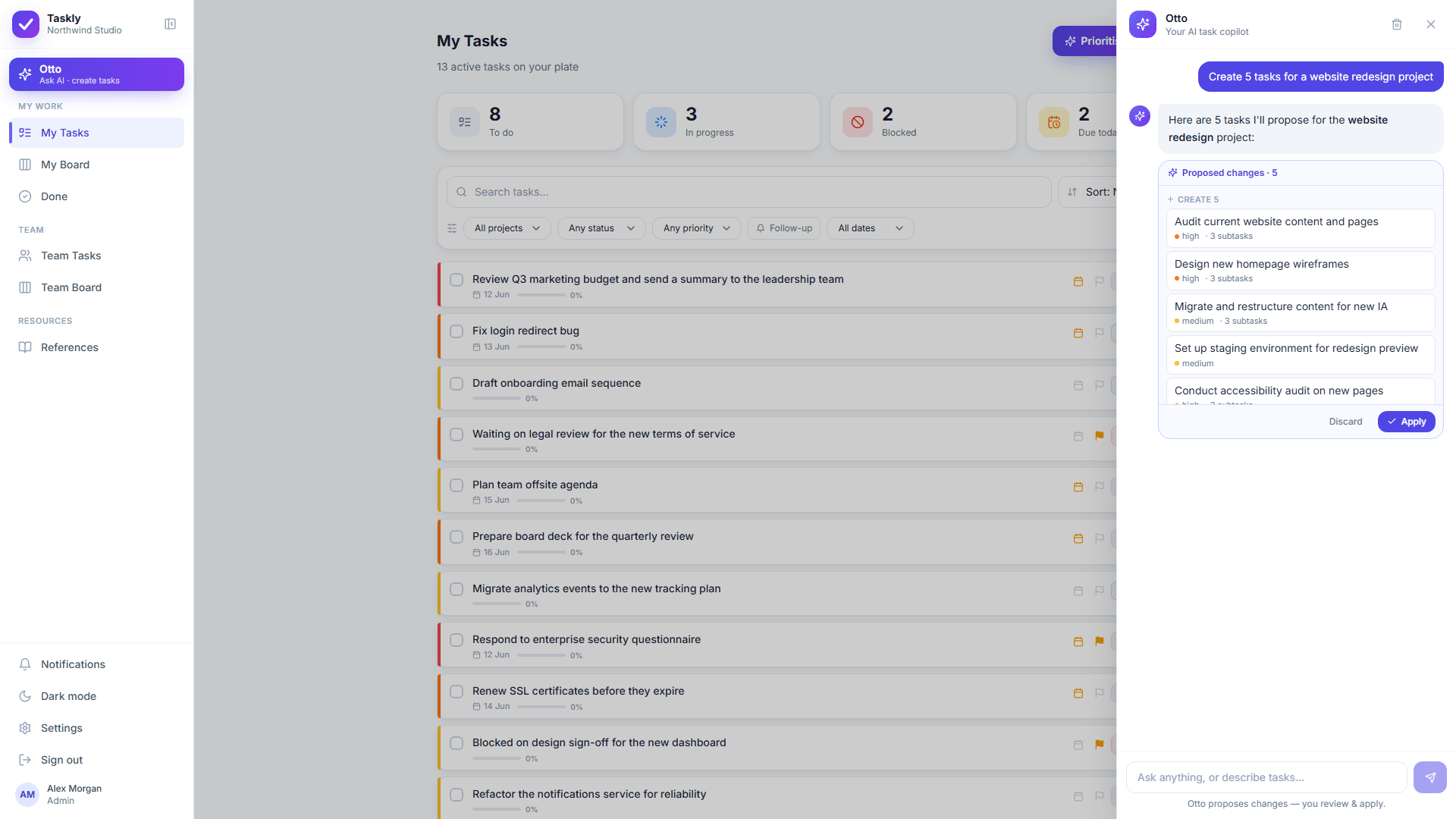
Notion AI is capable, and Notion AI is gated twice. It is available on Business and Enterprise, listed at $20 per member a month for Business, so the Free and Plus plans get a limited number of complimentary responses to try it with rather than ongoing use. Then, on Business, certain Notion AI features draw on a usage allowance, and Notion states that access to some AI features may temporarily pause if you come close to using it up, with anything beyond it sold as Notion credits at $10 per 1,000. Otto works differently in two ways that matter. Otto is part of Taskly, so there is no AI tier to reach, no allowance to watch and nothing to top up. And Otto does not act on its own: describe the work the way you would say it out loud, and every change Otto proposes, one task or fifty, arrives as a before and after you approve or discard.
Otto proposes. Nothing is created, moved or reassigned until you approve it.
Why teams look for a Notion alternative
•
A task list in Notion is a database you build first. The properties, the views, the filters and the templates are all decisions you make before Notion tracks a single task, and they are decisions you have to make again every time the team changes shape.
•
Notion AI is available on Business and Enterprise plans. Notion says Free and Plus users get "a limited number of complimentary AI responses so they can try Notion AI features out", and Notion does not publish that number.
•
Turning the AI on is a workspace decision, not a personal one. Business is listed at $20 per member a month, so one person wanting AI means moving everybody up a tier.
•
Even on Business the AI is allowanced. Notion says Business and Enterprise plans include a usage allowance for certain Notion AI features, and that if you come close to using the full allowance, access to some AI features may temporarily pause until your usage refreshes.
•
Usage past the allowance is metered. Notion credits are an add-on for Business and Enterprise, shared across the workspace, listed at $10 per 1,000 credits monthly or $13 per 1,000 annually, and monthly credits reset each month with nothing carried over.
•
Custom Agents, the part that actually does multi step work for you, are listed as free to try and then $10 per 1,000 credits.
•
The Free plan is shaped for one person. Notion lists blocks as unlimited for individuals and limited for workspaces with two or more members, with 5 MB file uploads, 10 guests and 7 days of page history.
•
The task database is usually the part of a Notion workspace that goes stale first, because the docs stay useful whether or not anyone updates them and a task board does not.
Taskly as your alternative
Taskly is the lightweight, AI-native alternative to Notion for teams whose real problem is tasks rather than documents. Taskly ships the board, subtasks, recurring tasks and a true team model already built, so there is no database to design, no view to configure and no template to maintain. Describe what needs doing in plain English and Otto drafts the tasks, priorities, owners and dates for you to review. Otto is part of Taskly rather than a tier you upgrade into or an allowance you watch, and the whole product is free while Taskly is in early access.
Side by side
Taskly vs Notion
Taskly
Notion
Setup time
Minutes: the board, subtasks and team model are already built
Hours to days: a task database, its properties, views and filters are yours to design
What a task is
A first class object with an owner, a due date, subtasks and recurrence
A row in a database, with whatever properties you decided to add
Learning curve
Open it and type
Low to read, real to build: databases, relations, rollups, filters and views
AI assistant
Otto creates and edits real tasks from plain English, behind a diff you approve
Notion AI and Notion Agent: capable across docs, search and multi step work
Which plan has the AI
Every plan. Otto is part of Taskly
Business and Enterprise. Free and Plus get a limited number of complimentary responses to try it (2026)
What the AI costs
Included: no AI tier, no credits, no per seat AI charge
Business is listed at $20 per member a month, and usage past the allowance is $10 per 1,000 credits (2026)
Does the AI ask first
Always. Every change is a before and after you approve or discard
Notion Agent is built to complete multi step work for you
Free plan
The whole product, Otto included, free while in early access
Blocks unlimited for individuals and limited for 2+ members, 5 MB uploads, 10 guests, 7 day page history (2026)
Docs, wikis and notes
None. Taskly does not try to be your document tool
Excellent, and the reason most teams are in Notion at all
Views
Board and list, plus My Tasks and Team views
Table, board, timeline, calendar, gallery and list, once you configure them
Maintenance
Nothing to maintain: there is no schema to own
Somebody owns the database, and that job never finishes
Notion figures checked against notion.com and the Notion help centre on 24 September 2026: Free $0, Plus $10 per member a month, Business $20 per member a month, Enterprise custom, with the pricing page noting savings of up to 20 percent on yearly billing. Notion AI is listed as available on Business and Enterprise. Prices and AI packaging move, so check notion.com before deciding. Taskly is free for the entire product, Otto included, while Taskly is in early access.
See it
What you get instead of Notion
app.ottotaskly.com
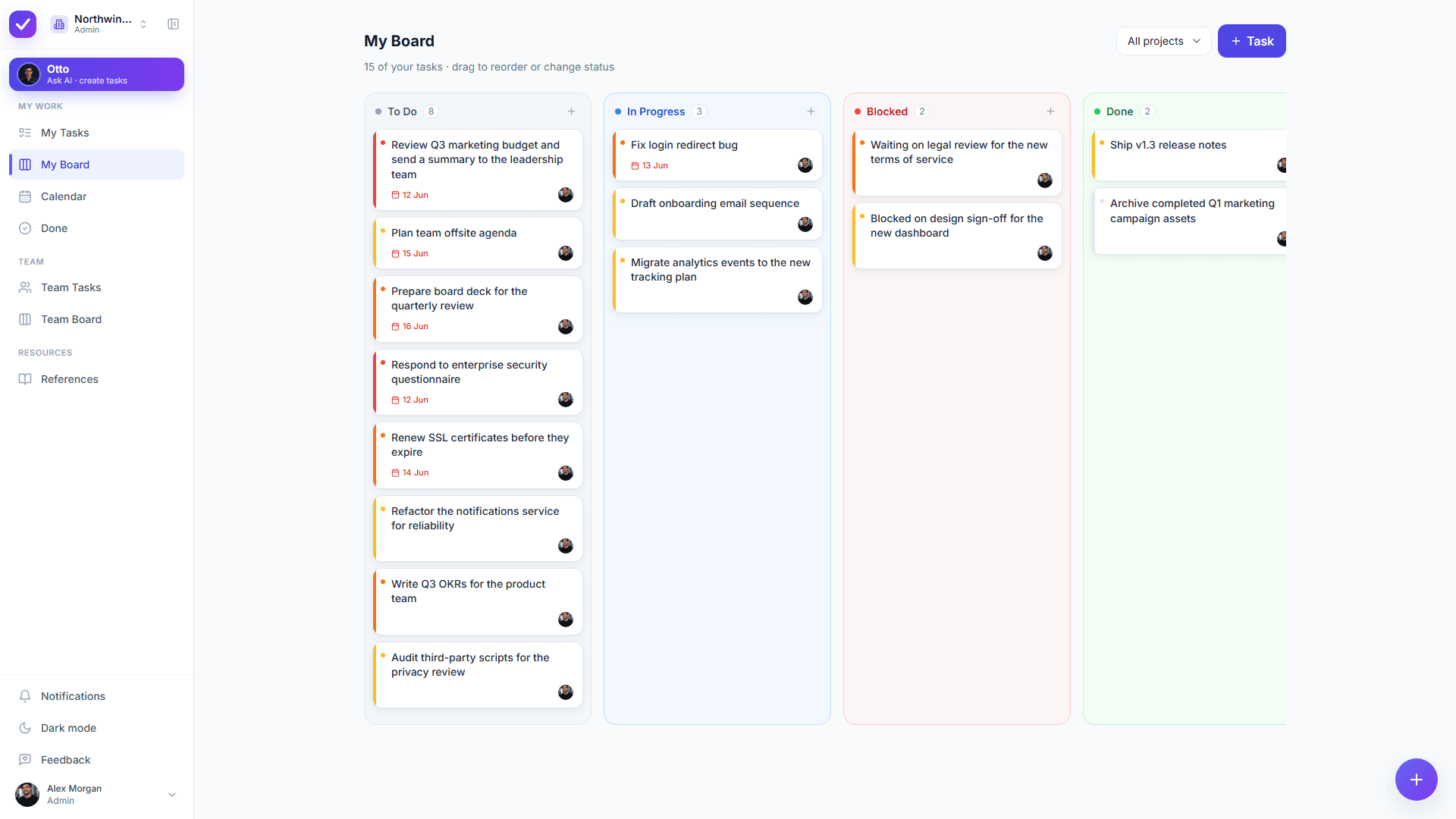
A board that exists before you do: To-Do, In-Progress, Blocked, Done, with no database, property or view to design first.
app.ottotaskly.com
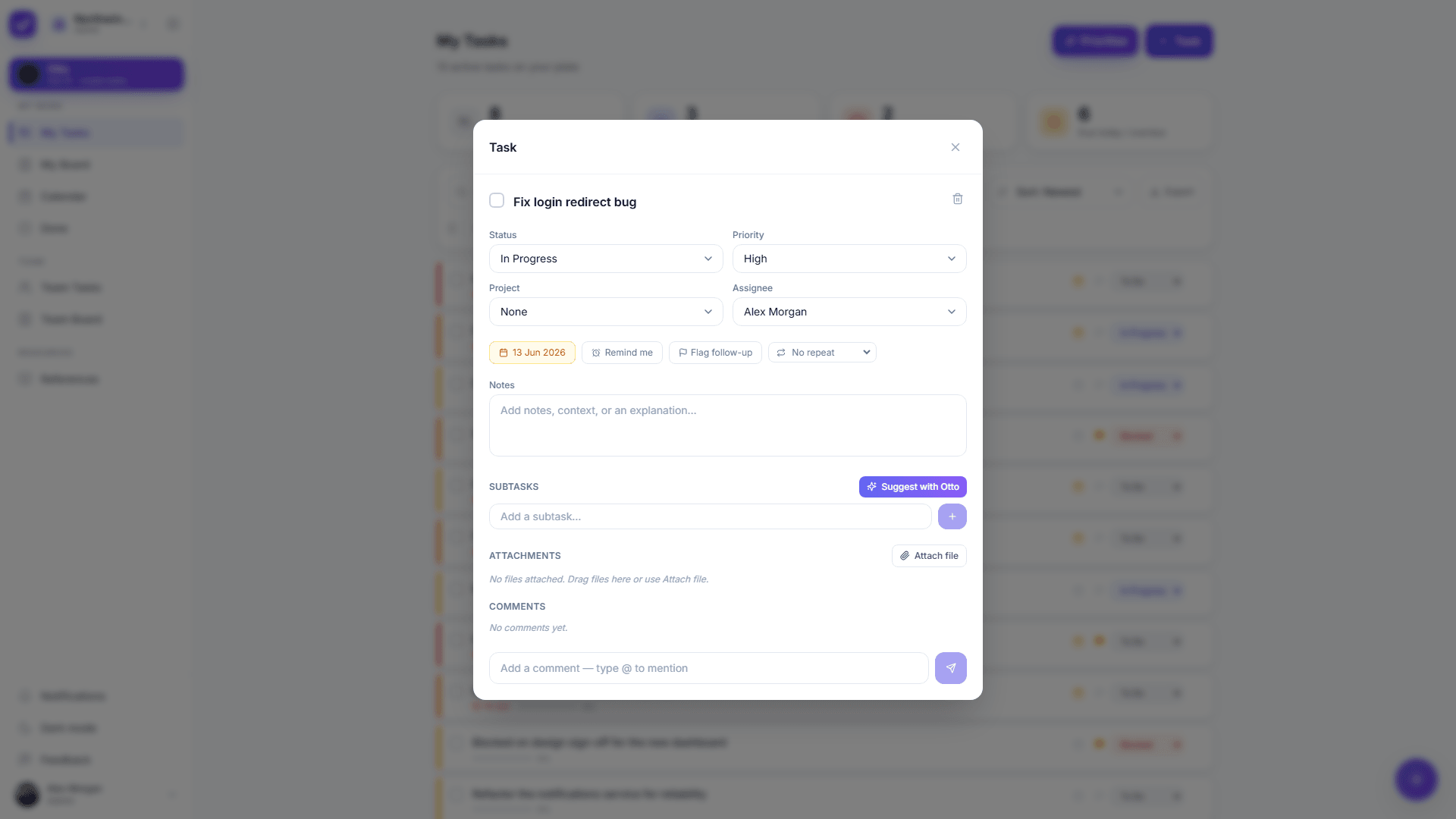
Status, priority, assignee, due date, repeat and subtasks are fields that are already there, rather than custom properties you add to a database.
app.ottotaskly.com
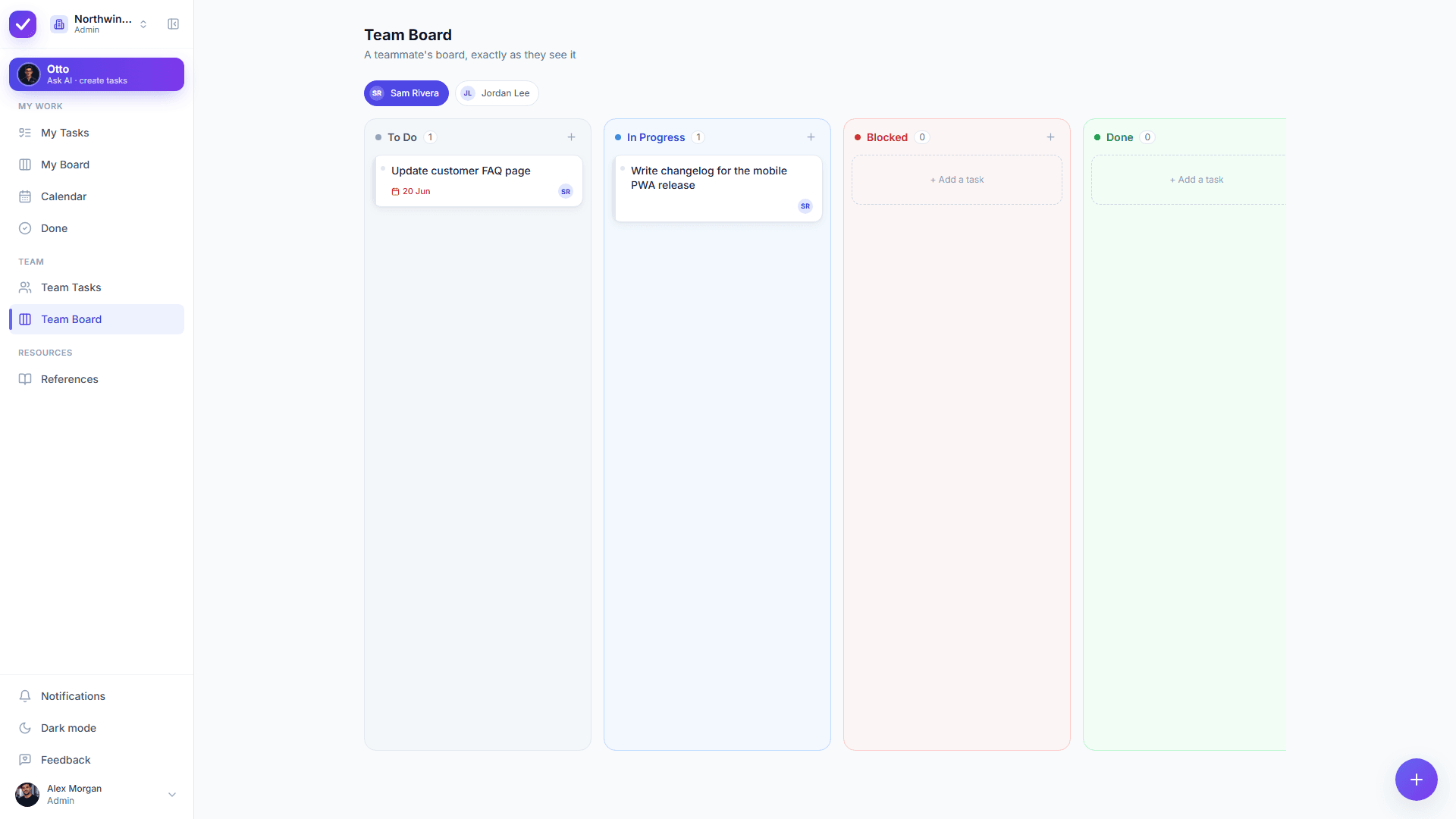
A real team model answers who owns what, without a permissions page or a shared database to maintain.
Choose Taskly if…
Your Notion task database keeps going stale while the docs stay useful.
You want the board, subtasks, owners and recurrence to exist before you do.
You do not want the AI to be a tier the whole workspace has to move up to.
You do not want to meter the AI, or to think about credits at all.
You want an AI that drafts the work and then waits, so nothing changes until you approve it.
You would rather nobody on the team owned a schema.
You want to start free today, with nothing to configure.
Notion is the better choice if…
• You want one place for documents, wikis, meeting notes and tasks, and the documents matter more than the tasks. Taskly has no docs, no wiki and no note taking at all.
• You want to design the exact data model your work needs. Taskly has no databases, no custom properties, no relations and no rollups.
• You need timeline, calendar or gallery views. Taskly has a board and a list, and no calendar layout.
• Your team is already fluent in Notion and the task database is genuinely maintained. A tool people already use beats a better tool they have to adopt.
• You need offline access or native desktop and mobile apps. Taskly is a web app and does not work offline.
• You depend on a wide integration surface. Taskly integrates with very little today.
We’d rather be honest than oversell: it’s your team’s call.
Switching from Notion
Moving tasks out of Notion is easier than people expect, because you only bring the live work. Export the task database to CSV if you want a record, then recreate the open items, or tell Otto "Create tasks for [project]..." and approve what Otto drafts, complete with owners, subtasks and due dates. Leave the docs in Notion. Most teams that move tasks to Taskly keep Notion for writing, which is the split the two tools are actually good at.
Taskly is a strong Notion alternative for teams whose real problem is tasks rather than documents. Taskly ships the board, subtasks, owners, recurring tasks and a team model already built, so there is no database to design and no view to configure, and Otto turns a plain English request into tasks you approve. The difference buyers usually notice first is the AI: Notion AI is available on Business and Enterprise plans, while Otto is included in Taskly on every plan and Taskly is free while in early access. Notion remains the better tool for docs and wikis, which Taskly does not have at all.
Is Notion AI included in the free plan?+
Notion AI is not included in the Notion free plan as ongoing use. Notion’s help centre states that Notion AI is available on Business and Enterprise plans, and that Free and Plus users get "a limited number of complimentary AI responses so they can try Notion AI features out". Notion does not publish how many responses that is. Business is listed at $20 per member a month (checked 24 September 2026), so switching the AI on is a decision for the whole workspace rather than one person. Taskly includes Otto on every plan, with no AI tier and no credits.
Does Notion charge extra for AI?+
Notion charges for AI in two ways as of 24 September 2026. First by plan: Notion AI is available on Business, listed at $20 per member a month, and Enterprise, while Free and Plus get a limited number of complimentary responses to try it. Second by usage: Business and Enterprise include an allowance for certain Notion AI features, and Notion says access to some AI features may temporarily pause if you come close to using the full allowance, with more usage sold as Notion credits at $10 per 1,000 monthly or $13 per 1,000 annually. Custom Agents are listed as free to try and then $10 per 1,000 credits. Taskly includes Otto with no AI tier and no credits.
Can Taskly replace Notion?+
Taskly can replace the task part of Notion and not the rest of it. If what your team actually does in Notion is track tasks on a board with owners, subtasks and due dates, Taskly does that with nothing to set up and an AI included. If your team also writes documents, keeps a wiki, runs meeting notes, builds related databases or relies on timeline and calendar views, Taskly has none of those and replacing Notion outright would cost you real work. The common and sensible split is tasks in Taskly, writing in Notion.
Is Taskly cheaper than Notion?+
Taskly is free for the entire product, Otto included, during early access. Notion lists Plus at $10 per member a month and Business at $20 per member a month (checked 24 September 2026), and the AI is part of what the Business tier buys rather than an add-on price. For a small team that wants AI assistance on its tasks without moving the whole workspace to Business, Taskly is less expensive today.
Does Taskly have databases and custom properties like Notion?+
Taskly does not have databases, custom properties, relations or rollups, and that is a design decision rather than a roadmap gap. Taskly has one shape of task, with an owner, a due date, subtasks, a priority and recurrence, on a board with fixed columns. The upside is that nothing needs designing or maintaining and a new teammate has nothing to learn. The downside is real: if your work genuinely needs a custom data model, Notion is the better tool and Taskly will feel narrow.
How do you move tasks from Notion to Taskly?+
Moving tasks from Notion to Taskly takes minutes because only the live work comes across. Export the Notion task database to CSV if you want a record of what was there, then recreate the open items in Taskly, or describe the project to Otto and approve the tasks, owners, subtasks and due dates Otto drafts. There is no importer today, so anything closed or archived is best left in Notion rather than migrated.
When is Notion still the better choice?+
Notion is still the better choice when the workspace is the point: documents, a wiki, meeting notes, a custom data model, and tasks as one database among many. Notion is also the better choice if the team is already fluent in it and the task database is genuinely maintained, because adoption beats features. Taskly is for the team that wants the task part to work on day one, with an AI included and every change waiting for approval, and is happy to keep writing somewhere else.