Free template
A kanban board template with real limits
Four columns, a work in progress limit that means something, and a written rule for when a card moves. Copy it. No email, no download.
No credit card · Free while in early access
Four columns, a work in progress limit that means something, and a written rule for when a card moves. Copy it. No email, no download.
No credit card · Free while in early access
Quick answer
A kanban board template is a ready-made column layout for work-as-cards, plus the limits and rules that govern how a card moves. A kanban board template that actually gets used specifies three things, not one: the columns (Backlog, Next Up, In Progress, Done), a work in progress limit on each (five in Next Up, two per person In Progress), and a written rule for when a card is allowed to cross each boundary. The free template below gives all three, along with the two short meetings the board needs to stay alive. Copy it into any tool. Nothing here is gated.
Select it, copy it, and paste it into a board tool, a whiteboard, a document or a text file. The limits below are a sane opening position for a team of two to fifteen, and the board will tell you within a fortnight whether they are right.
KANBAN BOARD TEMPLATE, SMALL TEAM

+-------------+-------------+-------------+-------------+
| BACKLOG     | NEXT UP     | IN PROGRESS | DONE        |
| no limit    | limit: 5    | limit: 2/pp | this week   |
+-------------+-------------+-------------+-------------+
| everything  | agreed at   | someone is  | cleared     |
| anyone has  | the Monday  | working on  | every       |
| asked for,  | pull, in    | it today,   | Friday      |
| unordered   | priority    | not "soon"  |             |
|             | order       |             |             |
+-------------+-------------+-------------+-------------+

BLOCKED is not a column. It is a flag on the card,
because a blocked card should keep its place in the
queue and keep counting against the WIP limit.

RULES FOR MOVING A CARD (agree these once, write them down)

  Backlog -> Next Up
    Only at the weekly pull. Only if it has an owner
    and one sentence saying what "done" means.

  Next Up -> In Progress
    Only if you are below your WIP limit.
    If you are at the limit, finish something first.
    Pull from the top, do not shop the list.

  In Progress -> Done
    Only when the "done" sentence is true.
    Not "code written". Not "sent for review".

  Anything -> Backlog
    Allowed, and healthy. Say why on the card.

CARD TEMPLATE
  Title:    verb + object ("Draft the Q4 landing copy")
  Owner:    one person, never two
  Done is:  one sentence, written before work starts
Size: S (half day) / M (1 to 2 days) / L (split it)Each column on a kanban board has a limit, a rule for how a card gets in and a rule for how it gets out. Writing the exit rule down is what stops the arguments about whether a card is really finished.
| Column | WIP limit | A card enters when | A card leaves when |
|---|---|---|---|
| Backlog | No limit | Anyone asks for something | It is pulled at the Monday pull, with an owner and a written definition of done |
| Next Up | 5 cards | It is agreed at the Monday pull, in priority order | Someone below their limit pulls it from the top |
| In Progress | 2 cards per person | Someone is working on it today, not "soon" | The definition of done written on the card is true |
| Done | This week only | The definition of done is true | The board is cleared every Friday |
A board that becomes decorative usually got exactly one of these four wrong. They are listed in the order they tend to fail.
Most abandoned boards died of column sprawl: In Review, In QA, Waiting On Client, Ready To Deploy. Each one looks like clarity and behaves like a parking space. Start with Backlog, Next Up, In Progress and Done, run it for a month, and only add a column when you can name the specific question the board failed to answer without it.
A kanban board without a work in progress limit is a to-do list drawn sideways. The limit is what forces finishing over starting. Two cards in progress per person is a sane opening number for a small team. If the limit feels painful, that is the limit working: the pain was always there, and the board is now showing it to you.
Giving blocked work its own column looks tidy and quietly removes the pressure to unblock it, because a blocked card sitting in a side column no longer counts against anyone. Flag the card instead and leave it where it is. It keeps its place in the queue, it keeps consuming the WIP limit, and it stays visibly in the way, which is the point.
The single most common argument on a kanban board is whether a card is finished, and it is always avoidable. Put one sentence on the card, before work starts, describing the state that makes it done. "Merged and deployed to production" is a sentence. "Finished" is not. The card template above has a line for it.
The case for a work in progress limit on a kanban board is not motivational, it is a queueing result. Little’s Law states that the average number of items in a stable system equals the average arrival rate multiplied by the average time each item spends in it. Rearranged for a board, average cycle time equals work in progress divided by throughput. Your throughput is roughly fixed by how fast the team actually works, so the only variable you control is how many cards are open at once. Halve the cards in progress and each one comes out in roughly half the time. Nothing about the team changed.
Source: Little, J. D. C. (1961), A Proof for the Queuing Formula: L = λW, Operations Research 9(3), 383 to 387. Checked 17 September 2026.
Six open cards do not cost six times the attention of one. When you leave a task unfinished to start another, part of your attention stays behind with the first one and measurably degrades your performance on the second. A work in progress limit is a way of paying that cost less often. Leroy, S. (2009), Why is it so hard to do my work? The challenge of attention residue when switching between work tasks, Organizational Behavior and Human Decision Processes 109(2), 168 to 181. Checked 17 September 2026.
Kanban were physical cards at Toyota, describing which parts were needed, where and when. Toyota’s own company history records that the new kanban management system was adopted at all of its plants in 1963, and credits kanban with making just-in-time production possible. The software board keeps the central idea intact: work gets pulled when there is capacity for it, rather than pushed when someone has time to assign it. Source: Toyota Motor Corporation, 75 Years of Toyota, Development and Deployment of the Toyota Production System. Checked 17 September 2026.
A kanban board is not self-maintaining, and it also does not need a ceremony longer than the work. Two short standing meetings are enough for a small team.
THE TWO MEETINGS THIS BOARD NEEDS

MONDAY PULL, 15 minutes
  1. Clear DONE. Look at it first, it is the only
     part of the board that is good news.
  2. Walk IN PROGRESS right to left. Anything stuck
     since last week gets a decision, not a nod.
  3. Refill NEXT UP to its limit, from the top of
     the backlog, in priority order.

FRIDAY CLOSE, 5 minutes
  Count the cards that reached DONE this week: ____
  Count the cards still in IN PROGRESS:        ____
  If the second number keeps growing, your WIP
limit is too high. Lower it by one and try again.The template above tells you what shape the board should be. Typing forty cards into it is the part that gets abandoned on a Tuesday afternoon. In Taskly you describe the project in plain English, and Otto proposes the cards, subtasks, owners and due dates as a before and after you approve or discard. Nothing is created until you say so.
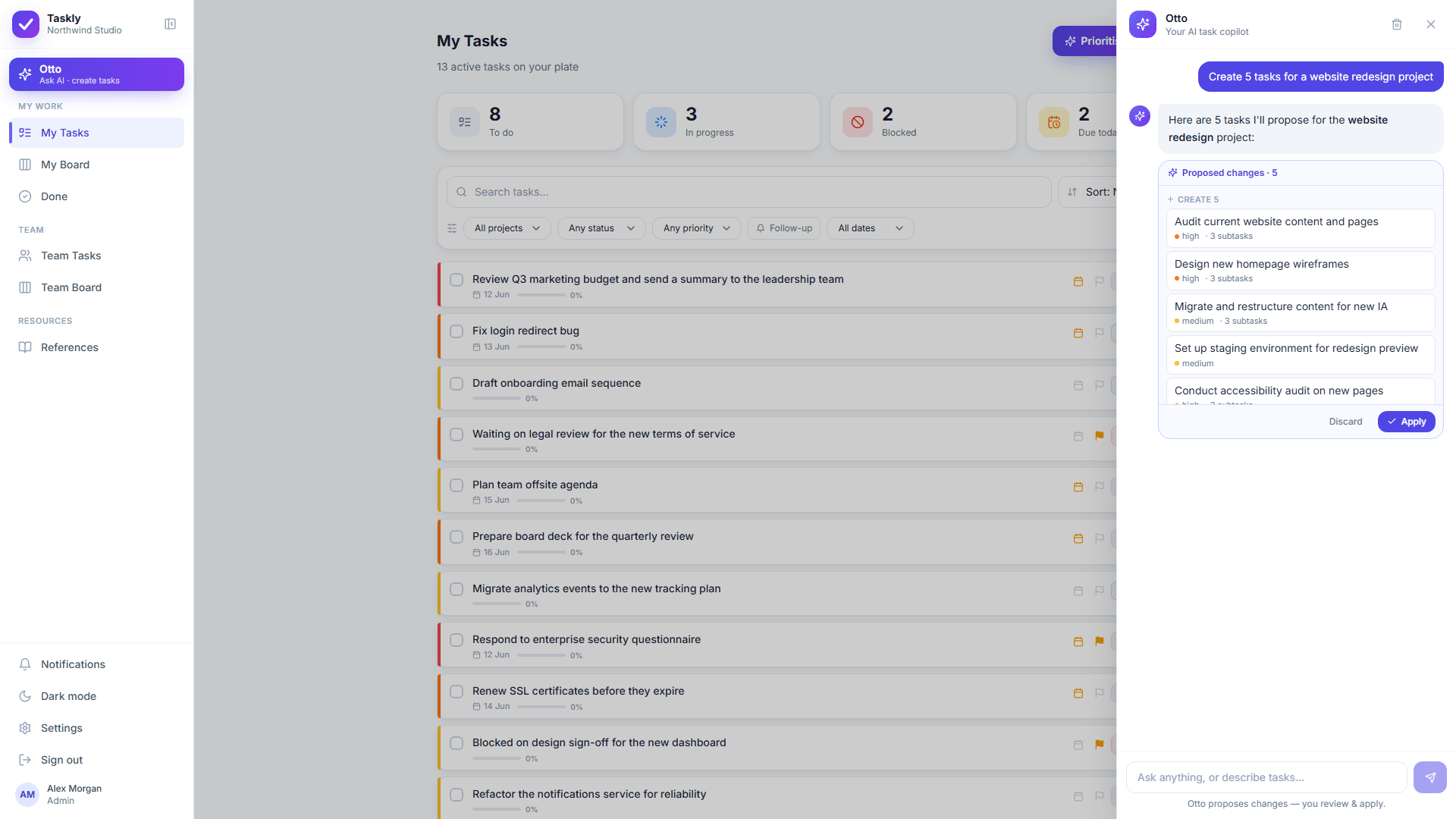
Otto proposes. Nothing is created, moved or reassigned until you approve it.
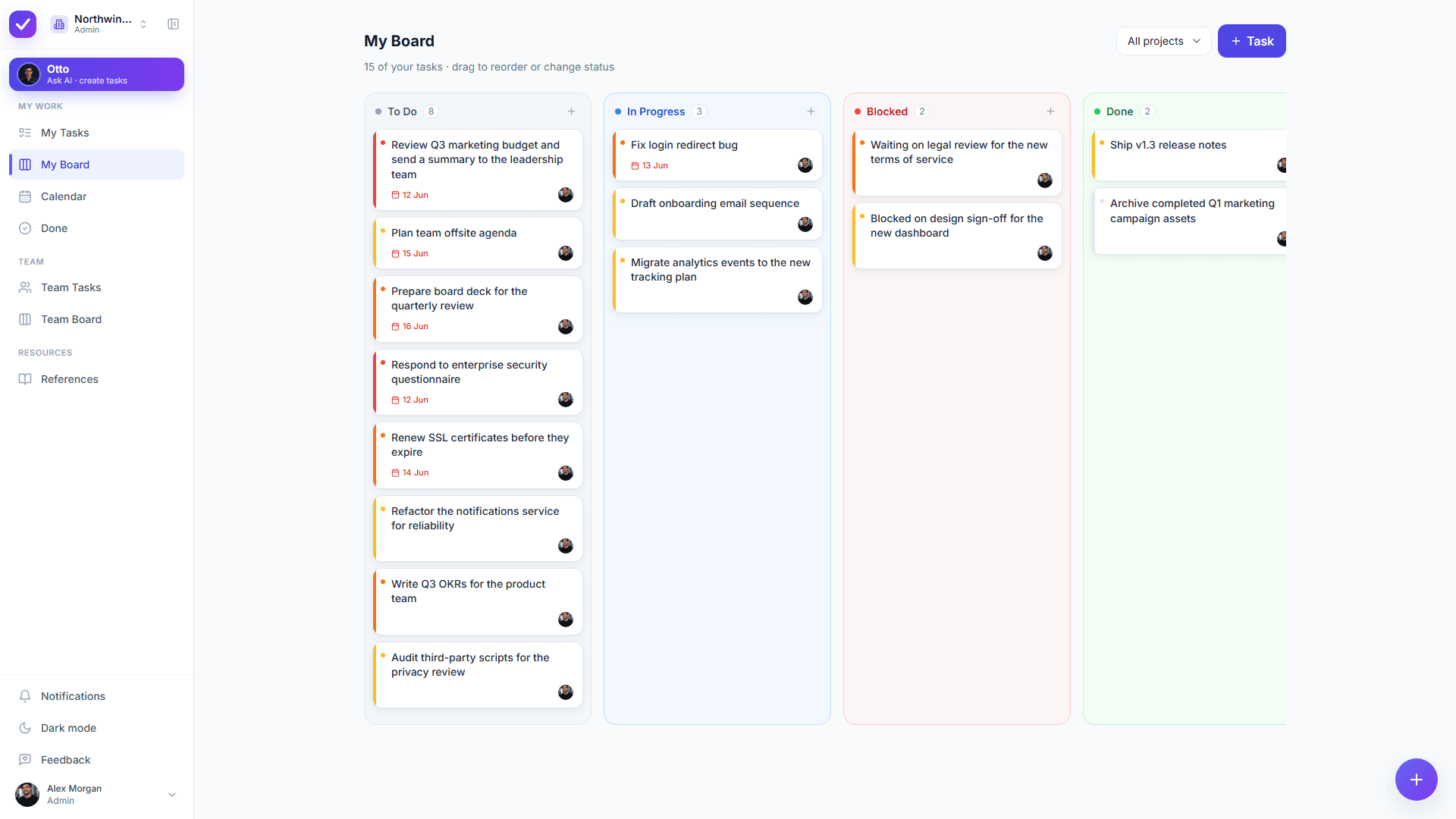
A Taskly board as it ships. The columns are your workspace’s own statuses, so they can be renamed to Backlog, Next Up, In Progress and Done. The Blocked column is a Taskly default; the limits below explain how to work around it.
Coming from another board tool? See the Trello alternative, Asana alternative and Jira alternative for small teams comparisons.
Choosing a tool rather than a layout? Start with the buyer’s guide to task management apps for teams.
Want the AI to keep the board honest? See the AI task manager and why Otto asks first.
Blocking time to actually work the cards? See the time blocking template.
This is a kanban template published by a task manager, so it is worth being plain about where the task manager stops.
Taskly has boards, columns, subtasks and a real team model, and Taskly will not stop you putting a seventh card in progress. The limit in this template is an agreement between people, not a setting. If you need the tool to block the move, a dedicated kanban product enforces it and Taskly does not.
New Taskly workspaces start with a Blocked column, and a workspace always keeps at least one. Taskly cards have no separate blocked flag. The nearest way to run this template as written is to leave a blocked card in In Progress, where it still counts against the limit, and write the blocker in the card’s comments.
Taskly gives each person a board and the team a shared board, both filterable by project. There are no swimlanes, no cycle time or cumulative flow charts, and no custom field builder. Teams that manage flow by measuring it will find Taskly thin.
Otto can create the cards, split them into subtasks, assign owners and propose an order with its reasoning. Otto cannot know that the small card is for your biggest client. Every change Otto proposes waits for your approval, and the judgement stays yours.
A kanban board template is a ready-made column layout for visualising work as cards that move left to right, together with the limits and rules that govern the moves. A useful kanban board template specifies three things rather than one: the columns, a work in progress limit for each, and a written rule for when a card is allowed to move. The free template on this page gives all three for a small team, using Backlog, Next Up, In Progress and Done.
A kanban board should start with four columns: Backlog, Next Up, In Progress and Done. Four is enough to show what is queued, what is committed, what is being worked on now and what finished, which is the whole job of the board. Extra columns such as In Review or In QA are worth adding only after a month of use, and only when you can name the specific question the four-column board failed to answer. Column sprawl is the most common way a kanban board becomes decorative.
A work in progress limit of two cards per person in the In Progress column is a reasonable starting point for a small team, and five cards total in a Next Up column. Those are starting points rather than findings, and the board itself tells you whether they are right: if the number of unfinished cards grows week on week, the limit is too high. The mathematical case for limiting work in progress is Little’s Law, which says average cycle time equals work in progress divided by throughput, so halving the number of things in flight roughly halves how long each one takes to come out.
A kanban board is usually better off flagging blocked cards than giving blocked work its own column. A Blocked column looks tidy and quietly relieves the pressure to unblock, because a card parked in a side column stops counting against anybody’s work in progress limit. Flagging the card instead keeps it in its place in the queue, keeps it consuming the limit, and keeps it visibly in the way, which is what gets it unblocked.
A kanban board manages a continuous flow of work with no fixed iteration, limits how much is in progress at once, and lets priorities change at any time. A scrum board manages a fixed-length sprint with scope committed at the start and a review at the end. Teams whose work arrives unpredictably, such as agencies, support and operations, generally fit kanban. Teams shipping planned increments on a cadence generally fit scrum. Neither is a better method in the abstract.
The kanban board comes from Toyota, where kanban were physical cards used to signal which parts were needed, where and when. Toyota’s own history records that the new kanban management system was adopted at all of its plants in 1963, and that kanban was what made just-in-time production possible. The software version keeps the central idea: work is pulled when there is capacity for it rather than pushed when someone has time to ask.
A kanban board works well for a team of two, and in some ways works better than it does for a team of twenty, because the whole board fits on one screen and nobody has to be told what changed. Keep the work in progress limit genuinely low, two cards each rather than four, and keep the Monday pull to ten minutes. The failure mode for a small team is not too little process, it is a board nobody clears on Friday.
An AI can do the setup work on a kanban board, which is the part small teams put off. In Taskly you describe the project in plain English and Otto proposes the cards, subtasks, owners, priorities and due dates as a before and after diff you approve or discard before anything is created. What an AI cannot do is agree a work in progress limit with your colleagues or decide what matters most to your business. Those stay human, and any tool claiming otherwise is overselling.
The kanban board template on this page is free, with no email required and no download. The whole template is on the page as copyable text so it can be pasted into any tool, including a whiteboard or a text file. Taskly itself is also free for the entire product, Otto included, while Taskly is in early access.
Describe the project and let Otto fill the board, then approve it with one click. Free while Taskly is in early access.
No credit card · Sign in with Google or email