The Tiimo alternative for the work that does not fit in one day
Tiimo is a visual day planner built for neurodivergent brains, and a good one: Apple named Tiimo iPhone App of the Year in the 2025 App Store Awards. Tiimo is also phone first. Tiimo’s own FAQ says the free version covers the iOS and Android apps only, lists the web app as one of the premium features, and states that the seven day trial is available only on a yearly subscription. Taskly solves the other half of the problem: the list of everything that is not happening today, in any browser, with a board, subtasks and recurring tasks, plus Otto, an AI that drafts the work and waits for your approval. Included, never metered, free while in early access.
Written by Saba Majidi, Founder, Taskly·Last reviewed
AI that asks first
An AI that proposes, and a plan you approve
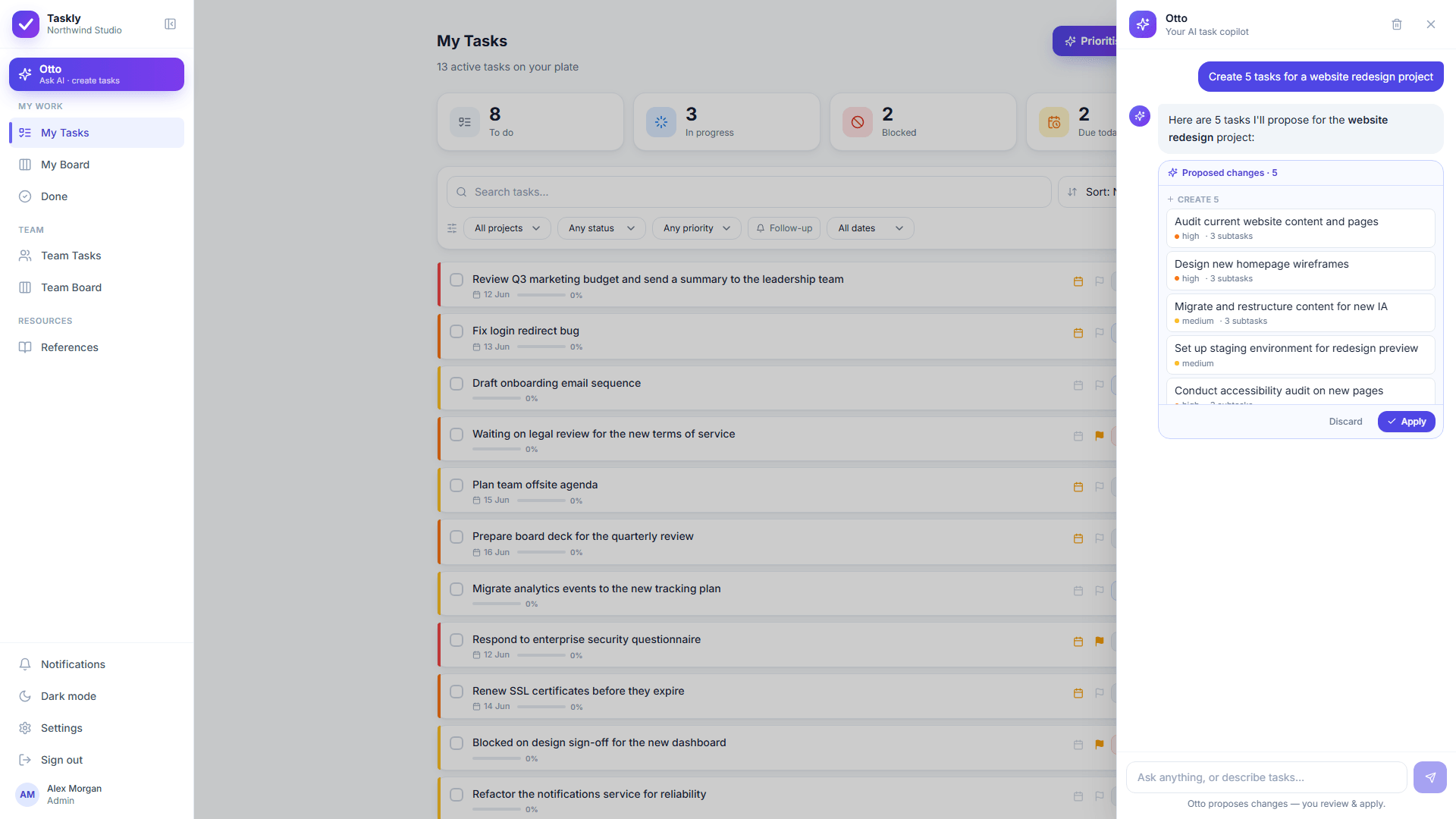
Tiimo’s AI is genuinely useful: describe what you need to do and it breaks the job into steps with time estimates on them. What Tiimo does not document anywhere on its product pages is a review step, so the plan arrives already made. Otto works the other way round. Describe the work the way you would say it out loud, and every change Otto proposes, one task or fifty, arrives as a before and after that you approve or discard. Nothing is created, moved, reprioritised or reassigned until you say so. And Otto is part of Taskly rather than a Pro feature, so there is no tier to reach, no allowance to watch and nothing to top up.
Otto proposes. Nothing is created, moved or reassigned until you approve it.
Why teams look for a Tiimo alternative
•
Tiimo plans the day you are in. Tiimo’s own help pages describe the Today tab as "your main view for the day" and the To-do tab as "Unscheduled ideas, or your mental inbox for anything you want to remember", which is a holding area rather than a system for the next six weeks of work.
•
The free version of Tiimo is mobile only. Tiimo writes that it "offers a free version with a selection of planning tools to help you get started (on iOS and Android apps only - web app not included)".
•
Planning at a desk is a paid feature. Tiimo states that "The web app is one of the premium features, and it is therefore required to have an active trial or subscription to access it."
•
Trying Tiimo Pro properly means committing to a year. Tiimo states that "The 7 day trial is only available when purchasing a yearly subscription", and that on a monthly subscription "the charge will occur right away".
•
Tiimo publishes no price on its own site. Tiimo says app prices may vary slightly by location and that your local price is shown in the App Store, Google Play or at web checkout, so you cannot compare cost before installing.
•
Building tomorrow’s timeline tonight is itself an executive function task, which is the one most likely to be skipped in the week you need Tiimo most.
•
Tiimo’s AI hands you a finished plan. Tiimo describes it as building step by step plans and estimating time, and Tiimo’s product pages do not document a review step before those steps land in your day.
•
Tiimo is built for one person. Tiimo’s site does not document sharing a plan with another person or collaborating with another Tiimo user, checked 29 October 2026.
Taskly as your alternative
Taskly is the AI-native alternative to Tiimo for people whose real problem is the backlog rather than the day. Taskly runs in any browser, free, and ships the board, the subtasks, the priorities and the recurring tasks already built, so there is no timeline to construct each evening. Describe what needs doing in plain English and Otto drafts the tasks, priorities and due dates for you to review. Otto is part of Taskly rather than a Pro feature, and the whole product is free while Taskly is in early access. Taskly does not try to replace what Tiimo is best at: Taskly has no timeline, no calendar layout and no focus timer.
Side by side
Taskly vs Tiimo
Taskly
Tiimo
What it is for
The list of everything, including the work that is not today
The day you are in, drawn as a visual timeline
Where the free version works
Anywhere Taskly works, which is any browser on any device
The iOS and Android apps only. Tiimo lists the web app as a premium feature (2026)
Free plan
The whole product, Otto included, while in early access
A selection of planning tools to get started, on the mobile apps (2026)
Trial
Nothing to trial: nothing is behind a paywall yet
Seven days, and only when buying the yearly subscription. Monthly is charged right away (2026)
AI assistant
Otto creates and edits real tasks from plain English, behind a diff you approve
Plan with AI and an AI Co-planner that build step by step plans and estimate time
Does the AI ask first
Always. Every change is a before and after you approve or discard
Tiimo’s product pages do not document a review step before the AI’s plan lands in the day
What the AI costs
Included on every plan: no AI tier, no credits, no per seat AI charge
AI task breakdown is listed as a Tiimo Pro feature (2026)
Published price
Free during early access, Otto included
None on Tiimo’s site. Tiimo shows your local price at checkout instead (2026)
Making time visible
None of it: no timeline, no calendar layout, no focus timer and no widgets
The whole point of the product: visual timeline, widgets, Live Activities, focus timer
What sits under a task
Status, priority, assignee, due date, subtasks and recurrence, already there
A time or Anytime, tags, notes and subtasks. Tiimo’s task FAQ does not document recurring tasks
Platforms
Any modern browser, phone browsers included. No native apps and no offline mode
iOS, iPadOS, watchOS, Android, Mac and web (2026)
A second person
A workspace of two works today: one owner per task, plus admin Team views
Tiimo’s site does not document sharing a plan with another Tiimo user
Privacy
Teammate emails are never sent to the AI model
Standard app store data handling
Taskly is free for the entire product, Otto included, while Taskly is in early access. Tiimo figures checked against tiimoapp.com and Tiimo’s own FAQ on 29 October 2026: Tiimo offers a free version with a selection of planning tools on the iOS and Android apps, with the web app listed as one of the premium features that needs an active trial or subscription. Tiimo Pro is sold monthly, or yearly at a discount, and Tiimo states that the seven day free trial is available only when purchasing a yearly subscription while a monthly subscription is charged immediately. Tiimo publishes no price on its own site and says prices may vary slightly by location, with the local figure shown in the App Store, on Google Play or at web checkout, so this page quotes no number. Check Tiimo before deciding.
See it
What you get instead of Tiimo
app.ottotaskly.com
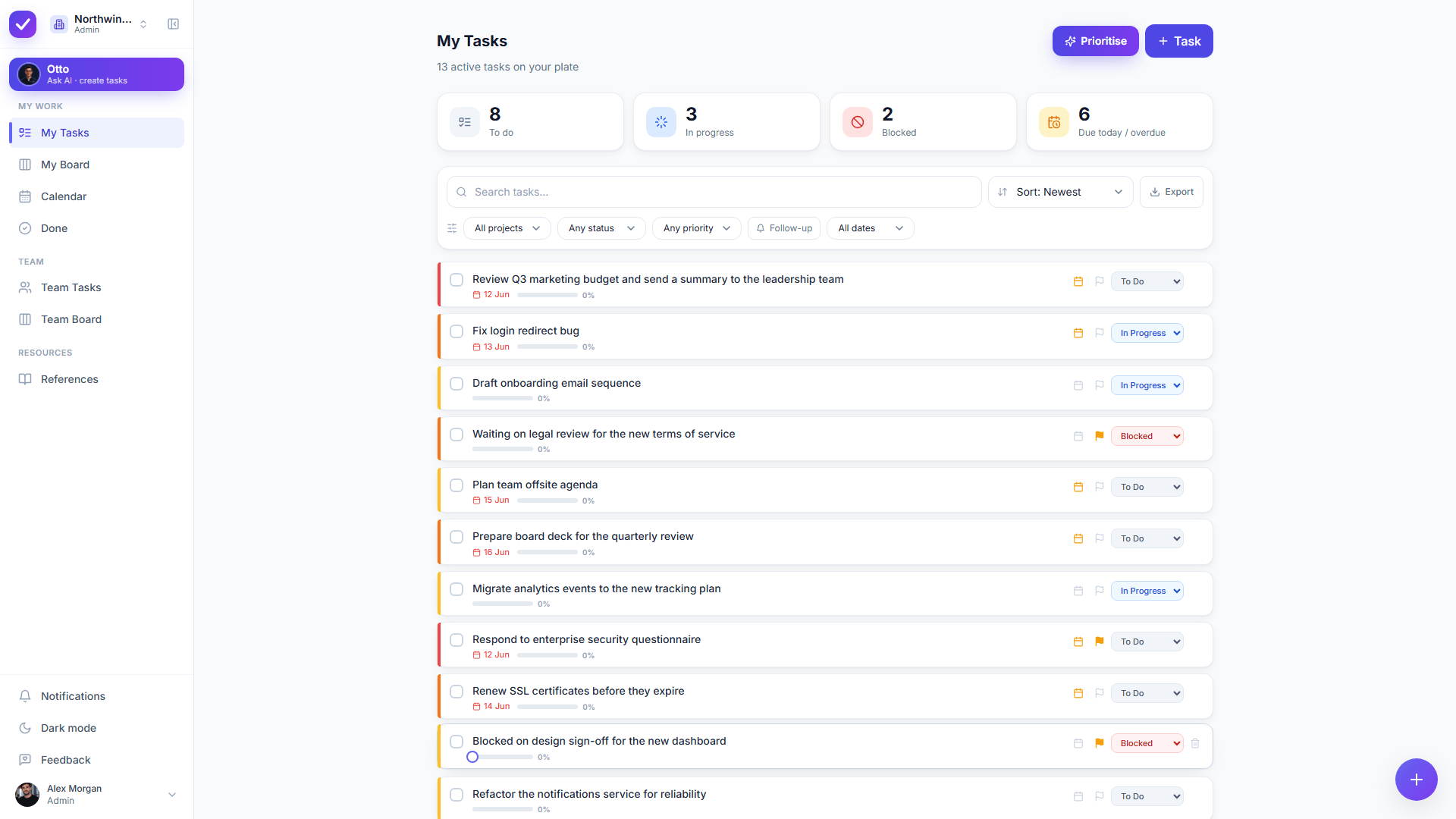
Everything you are not doing today, in one list, instead of a holding tab beside the day.
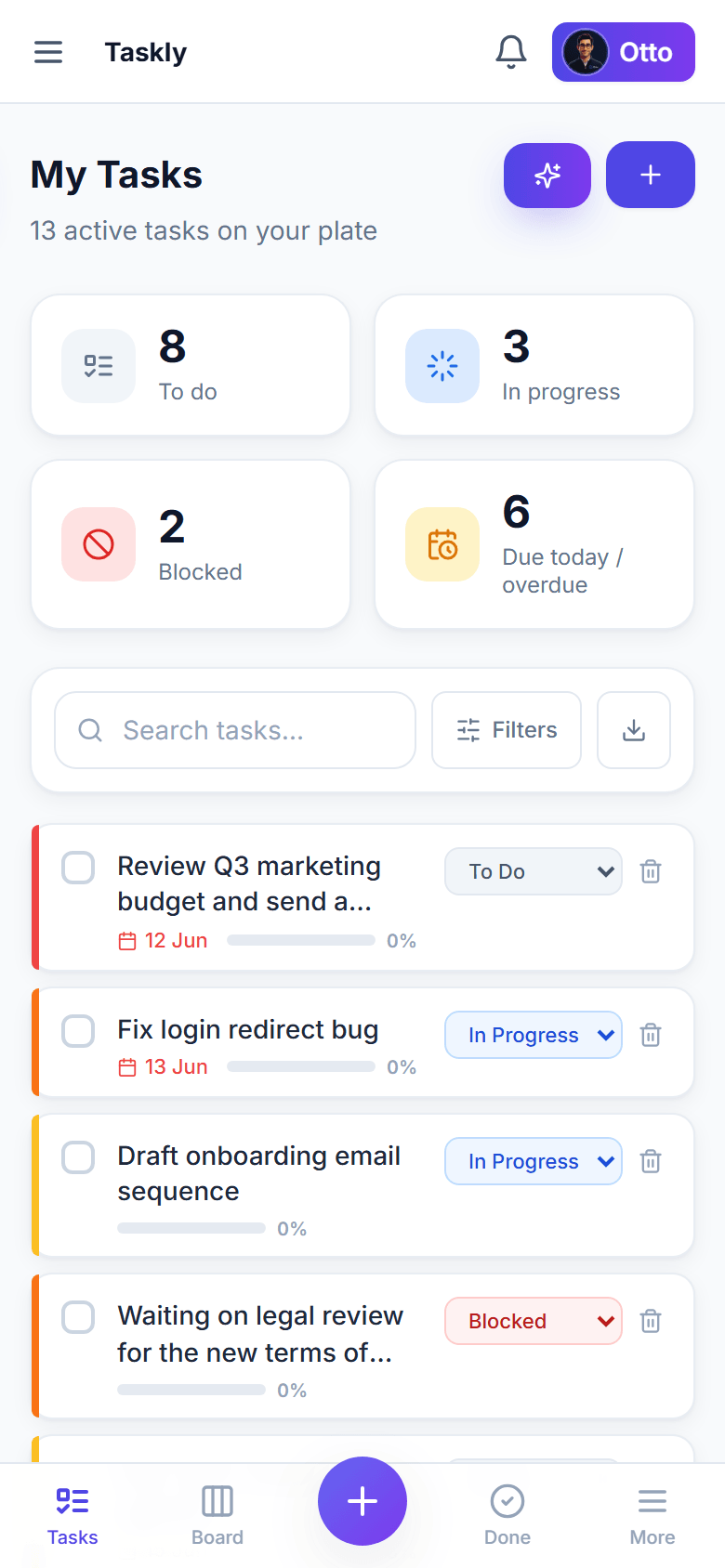
The same list on a phone, in the browser, with nothing to install and no separate free tier to find out about.
app.ottotaskly.com
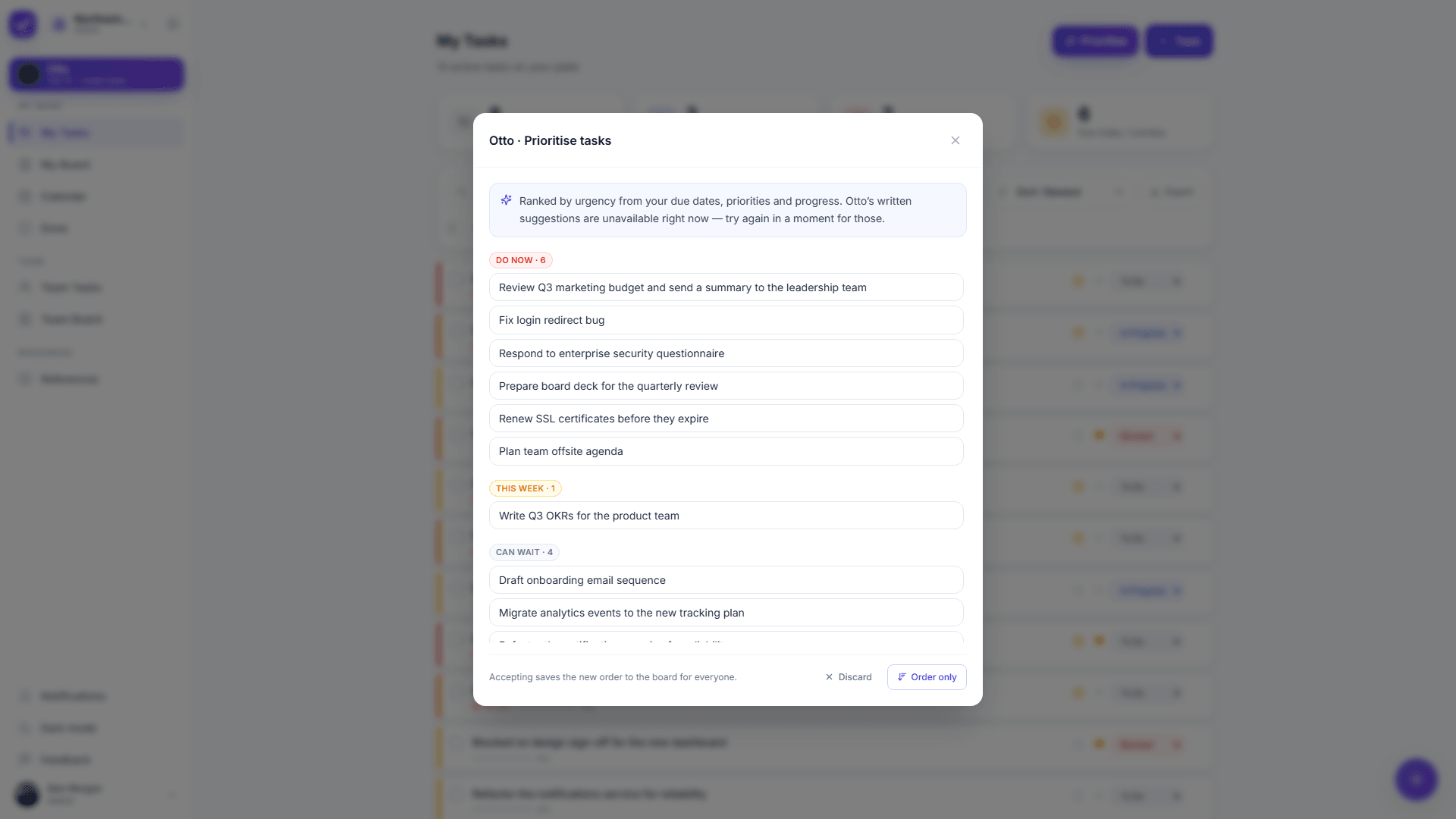
Priorities, due dates, subtasks and recurrence are fields that already exist, on every plan.
Choose Taskly if…
Your problem is the pile rather than the day, and a mental inbox beside today is not enough to hold it.
You plan at a desk in a browser, and you do not want the desktop version to be the paid one.
You want recurring tasks, subtasks, priorities and a board without working out which tier they sit in.
You want an AI that drafts the work and then waits, so nothing lands in your list until you approve it.
You share a list with one other person and do not want a second tool for that.
You do not want to commit to a year just to try the paid version properly.
Tiimo is the better choice if…
• Time blindness is the problem you are actually solving. Tiimo draws the day as a visual timeline with widgets, Live Activities and a focus timer, and Taskly has no timeline, no calendar layout and no timer at all.
• You plan on a phone or an Apple Watch. Tiimo ships native apps across iOS, iPadOS, watchOS, Android and Mac, and Taskly is a web app with no native app and no offline mode.
• You want a tool designed for neurodivergent users by a team that does nothing else. Apple named Tiimo iPhone App of the Year in the 2025 App Store Awards, and that award was for this design work specifically.
• You want the AI to hand you a finished plan with time estimates on it. Otto stops and waits for approval instead, which is slower on purpose.
• You need your calendar inside the planner. Taskly does not import or display calendars.
• You would rather pay for a finished single person app than use something still in early access with a small integration surface.
We’d rather be honest than oversell: it’s your team’s call.
Switching from Tiimo
Moving from Tiimo is unusually easy, because a Tiimo plan is mostly today and today expires on its own. Start a Taskly workspace, bring across the open items sitting in Tiimo’s To-do tab, or describe the projects to Otto with "Create tasks for [project]..." and approve the tasks, subtasks, priorities and due dates Otto drafts. Plenty of people keep Tiimo on the phone for the visual day and run the full backlog in Taskly, which is the split the two tools are genuinely good at.
If the part of Tiimo you cannot give up is seeing the day, this compares the apps that do it honestly the ADHD calendar app comparison.
FAQ
Tiimo alternative: questions
What is the best Tiimo alternative?+
Taskly is a strong Tiimo alternative for people whose problem is the backlog rather than the day. Taskly runs in any browser for free, with a board, subtasks, priorities and recurring tasks already built, and Otto turns a plain English request into tasks you approve first. Tiimo remains the better tool for making time visible, which Taskly does not attempt.
Is Tiimo free?+
Tiimo has a free version, and it is limited to the mobile apps. Tiimo’s FAQ states that Tiimo "offers a free version with a selection of planning tools to help you get started (on iOS and Android apps only - web app not included)", and separately that the web app is one of the premium features requiring an active trial or subscription. Checked 29 October 2026.
Does Tiimo have a web app, and is it included?+
Tiimo has a web planner and it is not included in the free version. Tiimo states that "The web app is one of the premium features, and it is therefore required to have an active trial or subscription to access it", so planning on a laptop means paying. Taskly is a web app first and is free during early access. Checked 29 October 2026.
How long is the Tiimo free trial?+
The Tiimo free trial is seven days, with a condition worth knowing before you start. Tiimo states that "The 7 day trial is only available when purchasing a yearly subscription", and that on a monthly subscription "the charge will occur right away". Taskly has nothing to trial because the whole product, Otto included, is free while Taskly is in early access. Checked 29 October 2026.
Can Taskly replace Tiimo?+
Taskly can replace the list half of Tiimo and not the day half. If what you need is somewhere to hold every open task with owners, subtasks, priorities and recurrence, Taskly does that in a browser with an AI included. If you need the day drawn as a visual timeline, with widgets, Live Activities and a focus timer, Taskly has none of those and replacing Tiimo outright would cost you the thing that works.
Does Tiimo’s AI ask before it changes your plan?+
Tiimo’s own product pages do not document a review step for its AI. Tiimo describes the AI as building step by step plans and estimating time, with no stated approval gate before those steps appear in the day. Otto is explicitly consent gated: every change Otto proposes, one task or fifty, arrives as a before and after that you approve or discard. Checked 29 October 2026.
How do you move from Tiimo to Taskly?+
Moving from Tiimo to Taskly takes minutes and there is no import to run. Recreate the open items from Tiimo’s To-do tab in Taskly, or describe each project to Otto and approve the tasks, subtasks, priorities and due dates Otto drafts. Tiimo plans are mostly same day, so almost nothing historical needs migrating at all.
When is Tiimo still the better choice?+
Tiimo is still the better choice when the failure you are fixing is time, not volume. A visual timeline, countdown widgets, Live Activities, a focus timer and native apps on iPhone, iPad, Apple Watch, Android and Mac are all things Tiimo has and Taskly does not. Taskly is for the person who can see the day fine and cannot see the backlog.